


Let’s be honest — selling online has changed
If you’ve been paying attention, ecommerce isn’t slowing down anytime soon. More people are buying online every year, and businesses are starting to realize something important: relying only on big marketplaces isn’t enough anymore.
At some point, you want your own space.
Running your own store means you control how things look, how products are presented, and how you talk to your customers. For small brands and independent creators, that kind of control matters more than ever.
The problem? Building a proper ecommerce site the old way is still a headache. You need developers, designers, hosting, and a lot of time. And if you’re just getting started, that cost and delay can kill momentum before you even launch.
That’s where things are starting to shift.
AI tools and no-code platforms are quietly changing how people build online stores. You don’t need to wire everything together anymore. You just need a clear idea of what you want.
Why more people are ditching marketplaces
This isn’t just about trends. There are real reasons businesses are moving toward their own ecommerce sites.
First, branding. On your own site, you decide how everything looks and feels. You’re not squeezed into someone else’s template.
Second, customer access. When you sell through your own store, you actually get to understand your audience and talk to them directly. That’s hard to do on large platforms.
Then there’s cost. Marketplace fees add up fast — listing fees, commissions, all of it. Running your own store cuts a lot of that out.
And finally, flexibility. Want to change how your product pages work? Add a new feature? Adjust the checkout flow? You can do it — no waiting for platform rules.
The part nobody tells you: building is the hard part
Here’s where most people hit the wall.
An ecommerce site isn’t just a homepage with products. There’s a lot going on behind the scenes:
- clean and usable design
- product listings and inventory
- payment systems
- order tracking
- user accounts
- hosting and databases
Individually, none of these are impossible. Together, they become a full project.
That’s why traditional development slows people down. It’s not one task — it’s everything at once.
So what exactly is MeDo?
MeDo is one of those tools trying to simplify this entire process.
Instead of breaking things into separate steps, it handles everything in one flow. You describe what you want — a store, a product layout, basic features — and the platform builds the structure for you.
That includes frontend pages, backend logic, and even the database setup.
You’re not wiring APIs manually. You’re not configuring servers. The system takes care of that part.
If you need extra functionality later, it also supports integrations, so you’re not locked into a closed system.
Why it actually works for ecommerce
There are plenty of AI tools out there, but most stop at “look, here’s some code” or “here’s a demo.”
That’s not enough if you’re trying to launch something real.
MeDo is more focused on getting you to a working product — something you can actually use, not just preview.
Here’s what stands out once you start using it:
Full store generation from a simple idea
- You can describe your shop in plain language, and the system builds the structure — pages, logic, and data included.
No coding required
- You don’t need to know how databases or APIs work. That part is handled for you.
Backend and database included
- Product data, user info, order handling — all of that is set up automatically instead of manually configured.
Easy integration with external services
- Payment tools, shipping systems, or other services can be connected when needed.
Low-cost way to get started
New users receive 300 Credits when they sign up, plus 100 Credits each day just for logging in. That means you can actually start building without paying anything upfront.
- If you need more capacity later, paid plans begin at $20 per month, which keeps things predictable for early-stage projects.
Step-by-step Guide: Building an Ecommerce Website with MeDo
Once you have a clear idea of what your store should look like, the next step is turning that concept into something real. Normally, this would involve multiple tools and a fair amount of setup. With AI tools like MeDo, a lot of that work is handled for you behind the scenes, which makes the whole process noticeably faster.
Here’s a simple way to go from idea to a working ecommerce site.
1. Describe core features
Start by writing out your store idea as clearly as possible. Think about what you’re selling, who it’s for, and what kind of experience you want users to have. A single detailed prompt is usually enough to get things started. For example:
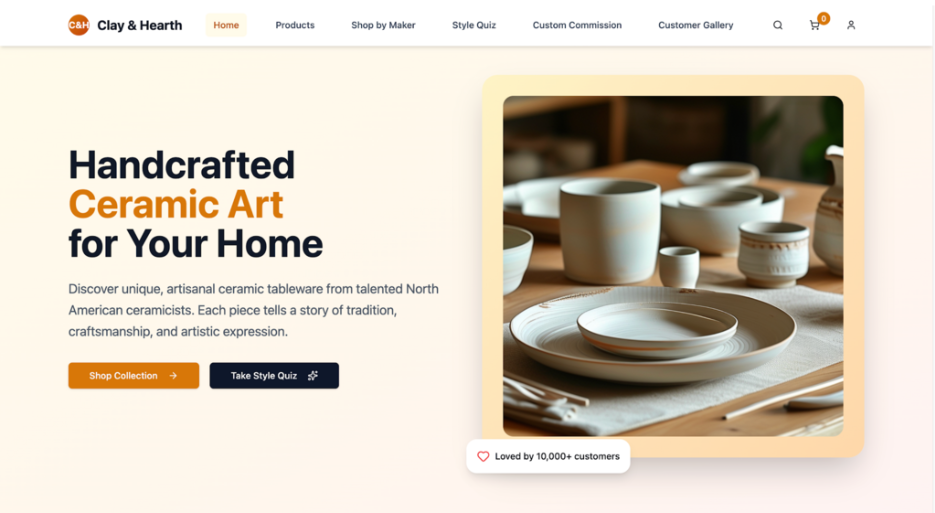
Create an e-commerce website for the North American market specializing in artisanal handcrafted ceramic tableware, named “Clay & Hearth”.
The site will feature unique, small-batch pieces from independent North American ceramicists, including dinner sets, mugs, serving bowls, and decorative vases.
Key features:
- a “Shop by Maker” section highlighting artist stories and studio locations;
- a “Style Quiz” (e.g., “rustic vs. minimalist”, “everyday use vs. special occasions”) to recommend pieces; AR functionality allowing users to visualize products on their own dining tables;
- and a “Custom Commission” tab for personalized orders. Include detailed care instructions, material sourcing info (e.g., locally mined clay), and carbon-neutral shipping options.
Design with warm, earthy tones to reflect the handcrafted aesthetic, and integrate customer photos of products in use.
2. Add products and connect payment
After the first version is ready, you can start filling in the actual content. This usually means uploading product images, setting prices, and writing descriptions.
At this stage, you can also link payment services so customers can complete purchases directly on your site. If needed, you can connect additional tools for shipping, inventory tracking, or order management to make the store fully functional.
3. Test and publish
Before going live, it’s worth going through the site as if you were a customer. Check product pages, try the checkout flow, and make sure everything behaves as expected.
Once you’re satisfied, you can publish the site and make it accessible to users. From there, it’s just a matter of refining and improving over time.
Conclusion
Ecommerce isn’t slowing down. But how stores are built is definitely changing.
If you can skip weeks of setup and get straight to a working store, that’s not just convenience — that’s leverage.
Tools like MeDo aren’t just about speed. They’re about lowering the barrier so more ideas actually get a chance to exist.
And right now, that might matter more than anything else.
